









DIY vs Professional Website Maintenance: An Honest Comparison for Small Business Owners
Last updated: April 2026 · 12-minute read · By GA Digital Solutions, Hyderabad
We are going to be direct about something: we are a professional website maintenance agency. You might expect us to argue that everyone should outsource their maintenance to a company like ours.
We are not going to do that.
The honest answer is that some business owners can and should handle parts of their website maintenance themselves. Some tasks are genuinely straightforward. Some businesses have the right skills in-house. And some budgets make DIY the only realistic option, at least initially.
But honesty also requires acknowledging the other side: many business owners who are managing their own maintenance are doing so with significant gaps — gaps they are not aware of, that represent real, accumulating risk to their website and their business.
This guide gives you a genuinely balanced comparison. Task by task. Cost by cost. Risk by risk. The goal is to help you make the right decision for your specific situation — not to sell you something.
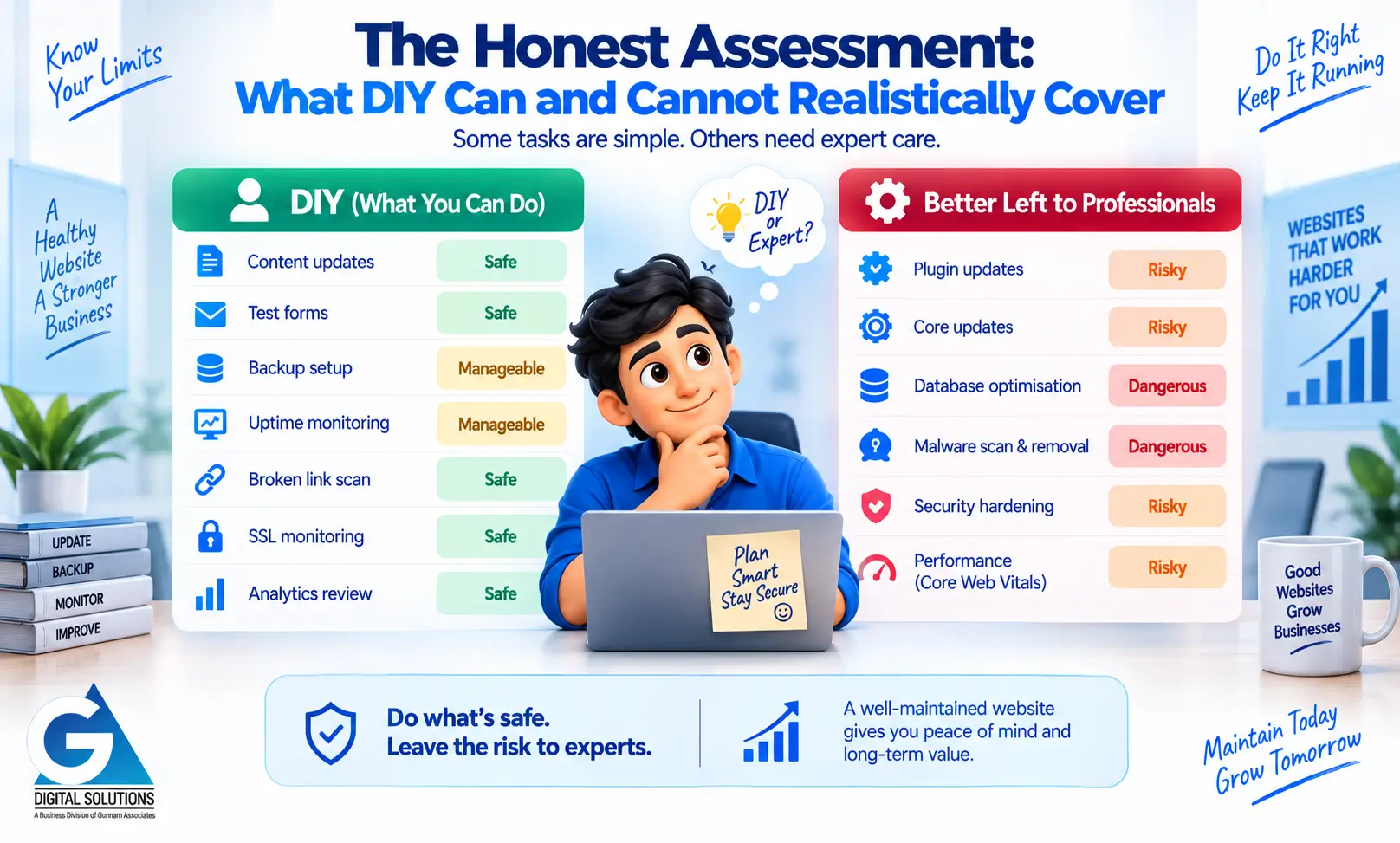
The Honest Assessment: What DIY Can and Cannot Realistically Cover
Not all maintenance tasks are equally technical. Some are genuinely manageable for a non-specialist. Others carry meaningful risk if done without the right knowledge and tools. Here is a task-by-task assessment.
| Maintenance Task | DIY Rating | DIY Reality | Pro Rating | Pro Standard |
|---|---|---|---|---|
| Content updates | Safe | Text, images, and copy changes are well within reach for most owners | Included | Covered in plan scope |
| Form functionality test | Safe | Submit your own form weekly. Simple, effective, takes 2 minutes | Included | Weekly automated + manual check |
| Plugin updates (minor) | Risky | Easy to do wrong. Compatibility conflicts can crash the live site | Professional | Staged, tested, verified before live |
| Plugin updates (major) | Dangerous | High conflict risk. Requires staging + rollback plan | Professional | Full staging environment required |
| CMS core update | Risky | Can break themes and plugins. Must be done with backup in place | Professional | Staged, tested, backed up first |
| Database optimisation | Dangerous | Incorrect commands can corrupt data permanently | Professional | Safe tools + verified process |
| Malware scanning | Manageable | Free tools exist but are incomplete. Miss embedded or obfuscated code | Professional | Commercial-grade scanner + manual review |
| Malware removal | Dangerous | Incomplete removal leads to immediate reinfection. Root cause must be fixed | Professional | Full cleanup + vulnerability patch |
| Security hardening | Risky | Partial hardening can give false confidence. Requires systematic approach | Professional | Layered security implementation |
| Backup setup | Manageable | Can configure plugins but testing restorability requires technical steps | Professional | Automated + off-site + tested monthly |
| Uptime monitoring | Manageable | Free tools available (UptimeRobot etc). Need to act quickly on alerts | Professional | 24/7 with <15 min response protocol |
| Core Web Vitals | Risky | Can measure with free tools but fixing requires developer knowledge | Professional | Measure, diagnose, and fix |
| Broken link scan | Safe | Free tools available. Fixing links is straightforward | Included | Monthly scan + automatic fix log |
| SSL monitoring | Safe | Check expiry date monthly. Set a calendar reminder | Included | Monitored + renewed automatically |
| Analytics review | Safe | GA4 / Search Console readable with basic training | Included | Interpreted report with plain-language summary |
Legend: Safe = manageable by most non-technical owners. Manageable = doable with care and the right tools. Risky = meaningful chance of causing a problem. Dangerous = high chance of causing serious damage without specialist knowledge.
The Hidden Cost of DIY: Your Time
The most common reason business owners choose DIY maintenance is cost savings. But the analysis is rarely complete, because it leaves out the most significant variable: your time.
Time spent on website maintenance is time not spent on billable work, client relationships, sales, product development, or strategic planning. For a business owner, this is not a zero-cost activity — it has a real opportunity cost that should be factored into any comparison.
| Business Owner Profile | Hours / Month | Hourly Value | Monthly Opp. Cost | Annual Opp. Cost |
|---|---|---|---|---|
| Freelancer / consultant | 4–6 hrs | ₹1,500/hr | ₹6,000–9,000 | ₹72,000–₹1,08,000 |
| SMB owner (₹10L/yr revenue) | 4–6 hrs | ₹800/hr | ₹3,200–4,800 | ₹38,400–₹57,600 |
| SMB owner (₹25L/yr revenue) | 4–6 hrs | ₹2,000/hr | ₹8,000–12,000 | ₹96,000–₹1,44,000 |
| SMB owner (₹50L/yr revenue) | 4–6 hrs | ₹4,000/hr | ₹16,000–24,000 | ₹1,92,000–₹2,88,000 |
Opportunity cost calculation: Monthly revenue ÷ working hours per month = effective hourly value. Example: ₹25L/year ÷ 12 months ÷ 26 working days ÷ 8 hours = ~₹1,002/hour. At 5 hours/month on maintenance, that is ₹5,000+ per month in real opportunity cost.
When you factor in the opportunity cost of your own time, professional maintenance — which costs ₹3,000–12,000/month depending on plan — often costs less than the implicit cost of doing it yourself. And it is done by people who do this every day, rather than a business owner fitting it around everything else.
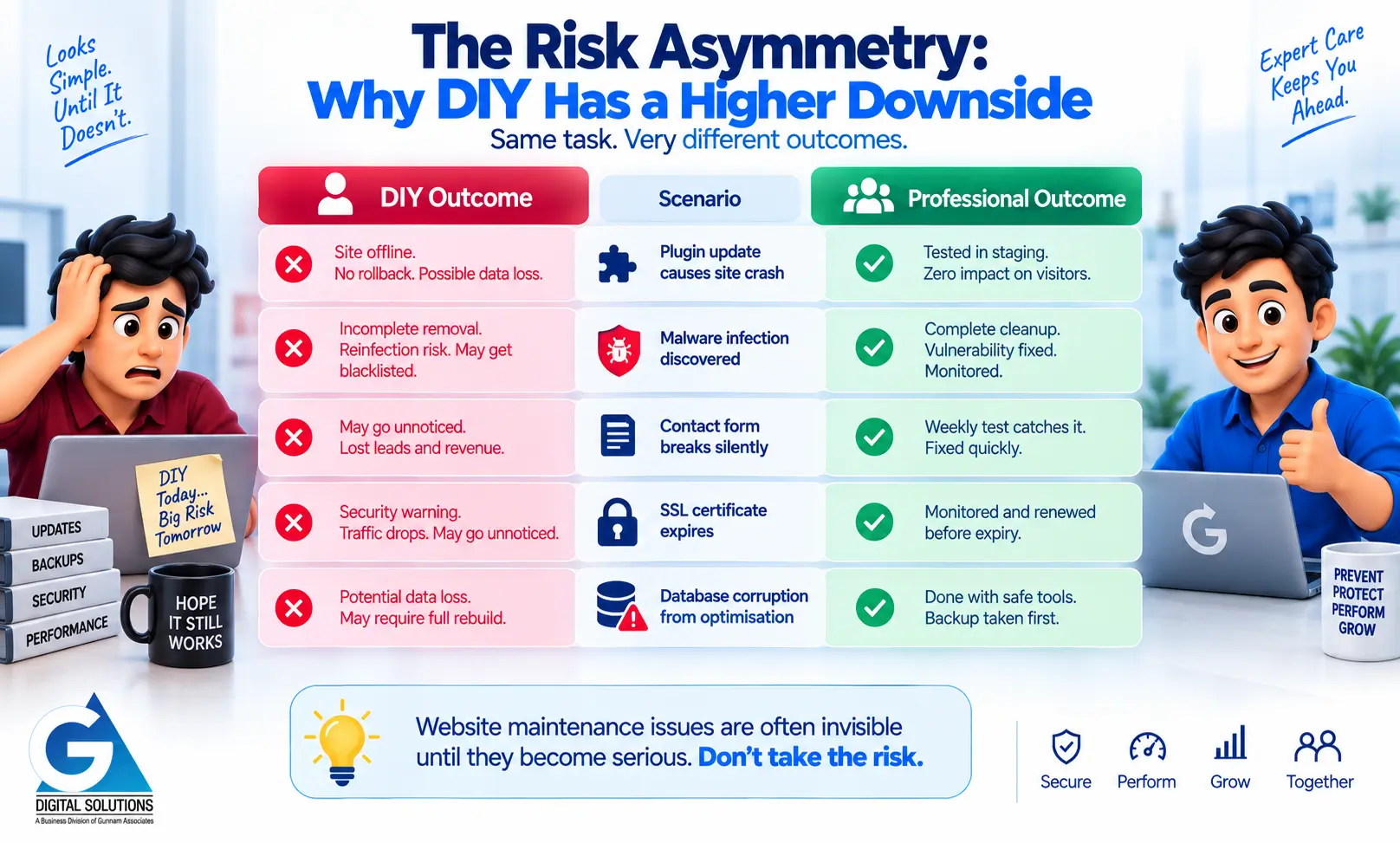
The Risk Asymmetry: Why DIY Has a Higher Downside
The risk profile of DIY and professional maintenance is fundamentally asymmetrical. A professional provider making a mistake typically catches it faster, has a rollback plan, and has the expertise to fix it quickly. A business owner making the same mistake may not catch it for days, may have no backup, and may face an expensive emergency recovery.
| Scenario | DIY Outcome | Professional Outcome |
|---|---|---|
| Plugin update causes site crash | Site offline. No staging means no rollback. Hours or days of recovery. Possible data loss if no recent backup. | Update was tested in staging. If a conflict is found, it is not pushed live. Zero impact on visitors. |
| Malware infection discovered | Incomplete DIY removal leads to reinfection within days. Root vulnerability not fixed. Google may blacklist site before owner realises. | Professional removal + vulnerability patch + monitoring. Site cleaned thoroughly. Recurrence prevented. |
| Contact form breaks silently | May go unnoticed for weeks. Revenue lost from leads that were never received. Discovered by accident or when a client mentions it. | Weekly form test catches it within 7 days. Fixed before significant revenue impact. |
| SSL certificate expires | Security warning visible to visitors. Traffic drops sharply. May not be noticed until someone reports it. | Certificate monitored monthly. Renewal initiated 30–60 days before expiry. Never lapses. |
| Database corruption from a bad optimisation | Potentially catastrophic data loss if no recent backup. Recovery may require full rebuild. | Optimisation done with proper tools and safety protocols. Backup taken immediately before. Risk near zero. |
The fundamental problem with DIY maintenance is not that business owners are incapable. It is that website maintenance failures tend to be invisible until they are serious — and without professional monitoring systems in place, they go undetected for longer.
The Practical Middle Ground: A Hybrid Approach
For many businesses, the right answer is not purely DIY or purely outsourced. A hybrid approach assigns responsibilities based on what each party does best.
What you handle (business owner side)
- ✅ Content updates — updating text, images, blog posts, and service descriptions
- ✅ Weekly form test — submit your own contact form and confirm receipt
- ✅ Domain and SSL renewal reminders — calendar reminders 60 days in advance
- ✅ Monthly analytics review — reviewing your GA4 or Search Console data
- ✅ Annual strategy review — assessing whether the website is meeting your business goals
What your maintenance provider handles (technical side)
- ✅ All software, plugin, and theme updates (staged and tested)
- ✅ Automated daily or weekly backups with off-site storage
- ✅ 24/7 uptime monitoring with rapid response protocols
- ✅ Security scanning, malware detection, and removal
- ✅ Database optimisation
- ✅ Broken link scanning and repair
- ✅ SSL certificate monitoring and renewal management
- ✅ Core Web Vitals and performance monitoring
- ✅ Monthly written report
This hybrid model gives you the best of both: you stay informed and in control of your content and strategy, while technical protection is handled by specialists who do it every day. The result is typically better protection, less risk, and more of your time freed for your actual business.
When DIY Makes Sense
To be genuinely balanced: there are situations where managing more of your maintenance yourself is a reasonable choice.
Your website is a simple, low-stakes static site
If your website is a basic portfolio or placeholder with no active forms, no e-commerce, minimal traffic, and no significant lead generation role, the risk profile of DIY is lower. A monthly manual check of core functions, a paid backup plugin, and SSL monitoring may be sufficient.
You have genuine technical skills in-house
If you or a team member has a strong background in web development and server management — not just basic WordPress familiarity — handling technical maintenance tasks in-house is a realistic option. The key question is whether that person has the time, the processes, and the tools to do it properly.
You are in an early-stage startup with severe budget constraints
If professional maintenance is genuinely unaffordable right now, a careful DIY approach is better than nothing. In this case: prioritise backups and uptime monitoring above everything else. Use a reputable backup plugin (UpdraftPlus), a free uptime monitor (UptimeRobot), and apply updates carefully one at a time. Accept the risk as a conscious, temporary decision — not a permanent state.
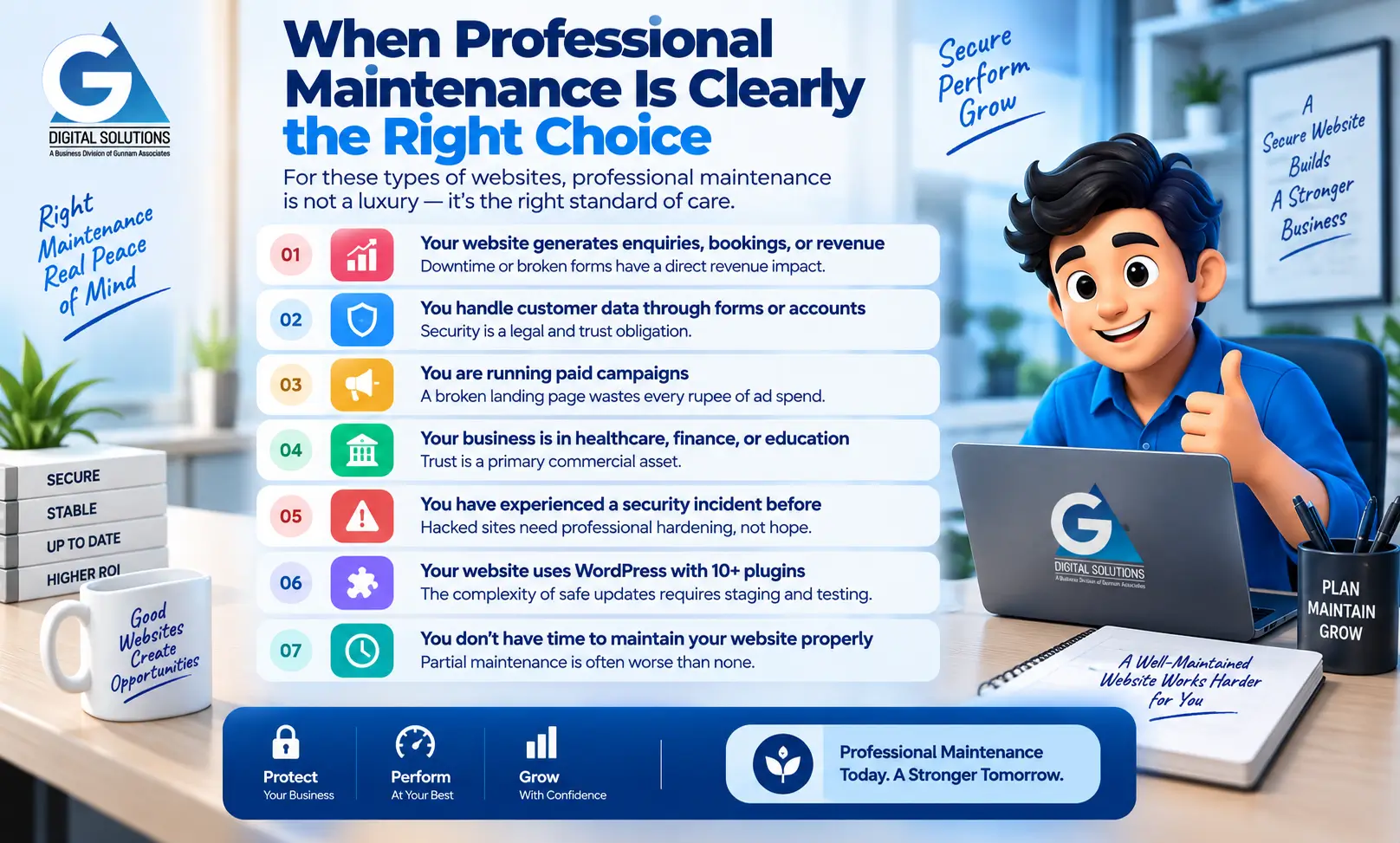
When Professional Maintenance Is Clearly the Right Choice
For the following types of websites, professional maintenance is not a luxury — it is the appropriate standard of care.
- ⚠️ Your website generates enquiries, bookings, or revenue — downtime or broken forms have a direct revenue impact
- ⚠️ You handle customer data through contact forms or accounts — security is a legal and trust obligation
- ⚠️ You are running paid campaigns driving traffic to your website — a broken landing page wastes every rupee of ad spend
- ⚠️ Your business operates in healthcare, finance, or education — trust is a primary commercial asset
- ⚠️ You have experienced a security incident before — hacked sites need professional hardening, not hope
- ⚠️ Your website is on WordPress with 10+ plugins — the complexity of safe updates requires staging and testing
- ⚠️ You genuinely do not have time to maintain your website properly — partial maintenance is often worse than none
→ Not sure whether your current setup is adequate? Get a Free 20-Point Website Health Audit
We check your website against 20 maintenance and security indicators and deliver a plain-language report within 2 business days. No cost, no obligation. Useful whether you are considering DIY or professional maintenance.
The Total Cost Comparison: DIY vs Professional Over 12 Months
Here is a realistic cost comparison for a standard Indian SMB website over a 12-month period, including the probability-weighted cost of incidents.
| Cost Item | DIY (12 months) | Professional Plan (12 months) |
|---|---|---|
| Tools and plugins (backup, security, uptime) | ₹5,000–8,000/yr | Included in plan |
| Your time (at ₹1,000/hr × 5 hrs/month) | ₹60,000/yr | ₹0 (no time required) |
| Emergency incident probability (30% chance × ₹30,000 avg cost) | ₹9,000 expected | ₹0 (included in plan) |
| Professional maintenance plan | N/A | ₹54,000–72,000/yr (₹4,500–6,000/mo) |
| TOTAL (realistic 12-month cost) | ₹74,000–77,000 | ₹54,000–72,000 |
This comparison uses conservative assumptions: a business owner valuing their time at ₹1,000/hour (lower than most SMB owners), spending 5 hours/month on maintenance (realistic for a moderately maintained site), and a 30% annual probability of a significant incident (conservative given typical plugin vulnerability exposure). In most real scenarios, the professional option costs the same or less than genuine DIY.
Frequently Asked Questions
Yes — and this is a reasonable approach for early-stage businesses. The important thing is to start the professional conversation before a serious incident occurs, rather than after. The transition to professional maintenance typically involves a technical audit of your current website to establish a baseline. If your site has been well-maintained, this is quick. If it has accumulated technical debt, the initial cleanup may take time and additional cost.
No. On-demand developer support is reactive, not proactive. Updates applied when you remember to ask are not the same as updates applied on a scheduled basis with staging and testing. Security scanning is not happening between your calls. Backups may or may not be running. This arrangement is better than nothing — but it is not a maintenance plan. Ask your developer explicitly what they are monitoring between your requests. The answer usually clarifies the gap.
At a minimum: (1) Install and configure a reliable backup plugin like UpdraftPlus, with backups sent to Google Drive or Dropbox. Verify backups are actually running. (2) Set up a free uptime monitor at UptimeRobot.com. (3) Apply plugin and WordPress updates monthly, one at a time, after taking a manual backup. (4) Test your contact form weekly. (5) Set a calendar reminder 60 days before your domain and SSL renew. This does not cover security scanning, database optimisation, or malware removal — but it significantly reduces the most common catastrophic failure modes.
Possibly, but less economical than it appears for most SMBs. A technically capable part-time hire or intern may manage some tasks well but is unlikely to have the specialised security knowledge, the monitoring infrastructure, and the tooling that a dedicated maintenance service provides. The infrastructure cost alone — monitoring tools, security scanners, staging environments, backup storage — typically exceeds what a professional maintenance plan costs.
A reputable professional maintenance service will apply routine maintenance tasks (updates, security scans, backups, optimisations) within the agreed scope without requiring approval for each action — otherwise the service would not be practical. However, any change that affects the visual appearance or content of your website, or any non-routine technical change, should be communicated and approved in advance. This should be specified clearly in your maintenance agreement.
Summary
The DIY vs professional maintenance question is not binary. Most business owners will handle some tasks themselves — content updates, form tests, analytics reviews — regardless of whether they also have a professional service in place.
The real question is whether the technical layer of maintenance — staged updates, security scanning, database optimisation, malware removal, backup verification, uptime monitoring — is being handled properly. For the vast majority of websites that play a meaningful role in a business’s revenue and reputation, this technical layer requires professional expertise, the right tools, and systematic processes.
The total cost of genuine DIY — including tools, your time, and the expected cost of incidents — is typically comparable to or higher than professional maintenance. The risk is higher. And the quality of protection is almost always lower.
If you are uncertain about the current state of your website’s maintenance, the right starting point is a professional audit. GA Digital Solutions offers a free 20-point website health audit that gives you an honest picture of what is and is not being done.
→ Get My Free Website Health Audit — Know Exactly What Your Site Needs
Continue Reading
Explore the full GA Digital Solutions website maintenance guide series.
Core Guides
- Website Maintenance Services: The Complete Guide for Indian Businesses (2026)
- What Is Website Maintenance? Everything Business Owners Need to Know
- How Often Should You Update Your Website?
- The Complete Website Maintenance Checklist
- What Happens If You Don't Maintain Your Website?
Compare & Decide
GA Digital Solutions is a full-service digital agency based in Hyderabad, India. We provide website maintenance, design and development, SEO, performance marketing, and lead management services to businesses across India.
Page last reviewed: April 2026
