









How Often Should You Update Your Website? A Practical Guide for Business Owners
Last updated: April 2026 · 11-minute read · By GA Digital Solutions, Hyderabad
"How often should I update my website?" is one of the questions we hear most from business owners across Hyderabad and India. It sounds simple. The honest answer is that it depends — but not in a vague, unhelpful way.
It depends on what type of update you are talking about, and what type of website you have. Different maintenance tasks have very different frequencies. Some things need to happen every day, automatically, without anyone thinking about them. Others are a monthly routine. Some are annual.
This guide breaks down every major website maintenance task, explains how often it should happen and why, and gives you a ready-to-use schedule you can apply to your own website immediately.
Why Maintenance Frequency Matters
The frequency of website maintenance is not arbitrary. Each task has a natural rhythm determined by the risk it manages and the rate at which the underlying conditions change.
Security vulnerabilities, for example, are discovered and exploited rapidly. A plugin with a known flaw can be actively targeted within hours of a vulnerability being published. Daily security monitoring is not overcaution — it is appropriate to the speed of the threat.
Content freshness, by contrast, changes slowly. Google's assessment of whether your website is active and current is based on patterns over weeks and months, not hours. Monthly content reviews are appropriate to that pace.
Understanding this logic helps you prioritise. Not every task is equally urgent. But every task has a frequency at which it should happen — and falling behind on that frequency is where problems begin.
Daily Maintenance Tasks
Daily tasks are almost entirely automated. No one should be manually checking these things every morning — the right systems handle them quietly in the background, and alert a human only when something needs attention.
| Task | Why It Matters | Who Is Responsible |
|---|---|---|
| Uptime monitoring | Automated checks every 1–5 minutes confirm your website is live and responding. If it goes down, your maintenance team is alerted immediately. | Automated system (maintenance provider) |
| Security scanning | Continuous scanning for malware, suspicious file changes, and attempted intrusions. Detects threats before they reach your visitors. | Automated system (maintenance provider) |
| Backup — e-commerce / high-traffic sites | Daily snapshots of your entire website stored off-site. For sites that change daily (orders, inventory, bookings), a daily backup is essential. | Automated system (maintenance provider) |
| Error log monitoring | Server and application errors logged automatically. Patterns in errors can signal emerging issues before they become visible problems. | Automated system (maintenance provider) |
If your current setup does not include 24/7 automated uptime monitoring and daily security scanning, your website is unprotected during the significant portion of each day when no human is actively watching it.
Weekly Maintenance Tasks
Weekly tasks sit between the fully automated and the fully manual. Some require a human to review automated reports and make decisions. Others are quick checks that catch issues before they compound.
| Task | Why It Matters | Who Is Responsible |
|---|---|---|
| Plugin and theme update review | Review available updates for your CMS, plugins, and themes. Not all updates need to be applied the moment they are released — but they should be reviewed weekly and applied on a planned schedule. | Maintenance provider |
| Backup — standard brochure websites | Weekly backups are the minimum for a standard business website with relatively stable content. If your content changes more frequently, consider moving to daily. | Automated system (maintenance provider) |
| Spam and comment cleanup | Spam comments and form submissions accumulate rapidly on websites without moderation. Unchecked, they bloat your database and can introduce malicious links. | Maintenance provider or business owner |
| Performance spot check | A quick check of your website's load time and Core Web Vitals score flags any performance degradation that has developed during the week. | Maintenance provider |
| Form functionality test | A quick submission test on your primary contact forms confirms they are still receiving and forwarding enquiries correctly. | Maintenance provider or business owner |
The weekly form test is one of the highest-value, lowest-effort checks on this entire schedule. Broken forms cost businesses revenue silently. A 30-second test prevents that.
Monthly Maintenance Tasks
Monthly maintenance is the core of any professional website maintenance plan. This is where the most impactful technical work happens — updates applied, databases cleaned, performance reviewed, and reports produced.
| Task | Why It Matters | Who Is Responsible |
|---|---|---|
| Software updates (CMS, plugins, themes) | All available updates reviewed, tested in a staging environment, and applied to the live site. Testing before applying is non-negotiable — compatibility conflicts can take a site offline. | Maintenance provider |
| Database optimisation | Removal of post revisions, transient data, spam, and orphaned records. Keeps your database lean and your website fast. | Maintenance provider |
| Broken link check | Scan all internal and external links for errors (404s, redirects to wrong pages, dead external URLs). Fix or redirect as appropriate. | Maintenance provider |
| SSL certificate status check | Confirm your SSL certificate is valid and note its expiry date. Certificates typically expire annually — monthly monitoring ensures no surprises. | Maintenance provider |
| Security scan review | Review the results of the month's automated security scans. Investigate any flagged items and apply hardening measures where needed. | Maintenance provider |
| Content review | Check for outdated information: old phone numbers, staff who have left, expired promotions, products or services no longer offered, incorrect pricing. | Business owner + maintenance provider |
| Analytics and performance report | A plain-language summary of your website's traffic, top pages, conversion rates, and any issues found and resolved during the month. | Maintenance provider |
| Conversion point audit | Test all forms, call buttons, WhatsApp links, and booking systems. Confirm that every path a visitor can take to become a lead is working correctly. | Maintenance provider |
The monthly report is your most important communication from your maintenance provider. If you are currently receiving maintenance but not getting a monthly report, ask why. Transparency is a basic standard of professional service.

Quarterly Maintenance Tasks
Quarterly reviews take a broader view. Where monthly maintenance handles the immediate technical upkeep, quarterly tasks assess the bigger picture — how the website is performing in search, how it compares to current standards, and whether anything needs more significant attention.
| Task | Why It Matters | Who Is Responsible |
|---|---|---|
| Full security audit | A comprehensive review of your website's security posture: user access controls, login attempt logs, firewall rules, file permissions, and any flagged vulnerabilities from the past quarter. | Maintenance provider |
| Core Web Vitals assessment | Google's Core Web Vitals (LCP, INP, CLS) are a direct ranking factor. A quarterly assessment identifies any scores that have deteriorated and prioritises fixes. | Maintenance provider |
| SEO technical health check | Crawl errors, indexing issues, sitemap accuracy, canonical tags, and schema markup reviewed. Ensures Google can find, read, and correctly rank every important page on your site. | Maintenance provider |
| Content audit | Review which pages are receiving traffic and which are not. Identify pages that could be updated, improved, or consolidated. Inform future content planning. | Business owner + maintenance provider |
| Hosting environment review | Review current hosting performance, server response times, and resource usage. Assess whether your current plan still meets your needs or whether an upgrade is warranted. | Maintenance provider |
| Third-party integration check | Verify that all third-party tools — payment gateways, CRM connections, email marketing integrations, chatbots, booking systems — are still functioning as expected. | Maintenance provider |
A quarterly SEO health check is one of the most underused aspects of website maintenance. Many businesses discover crawl errors, deindexed pages, or broken sitemaps only when their traffic has already declined significantly.
Annual Maintenance Tasks
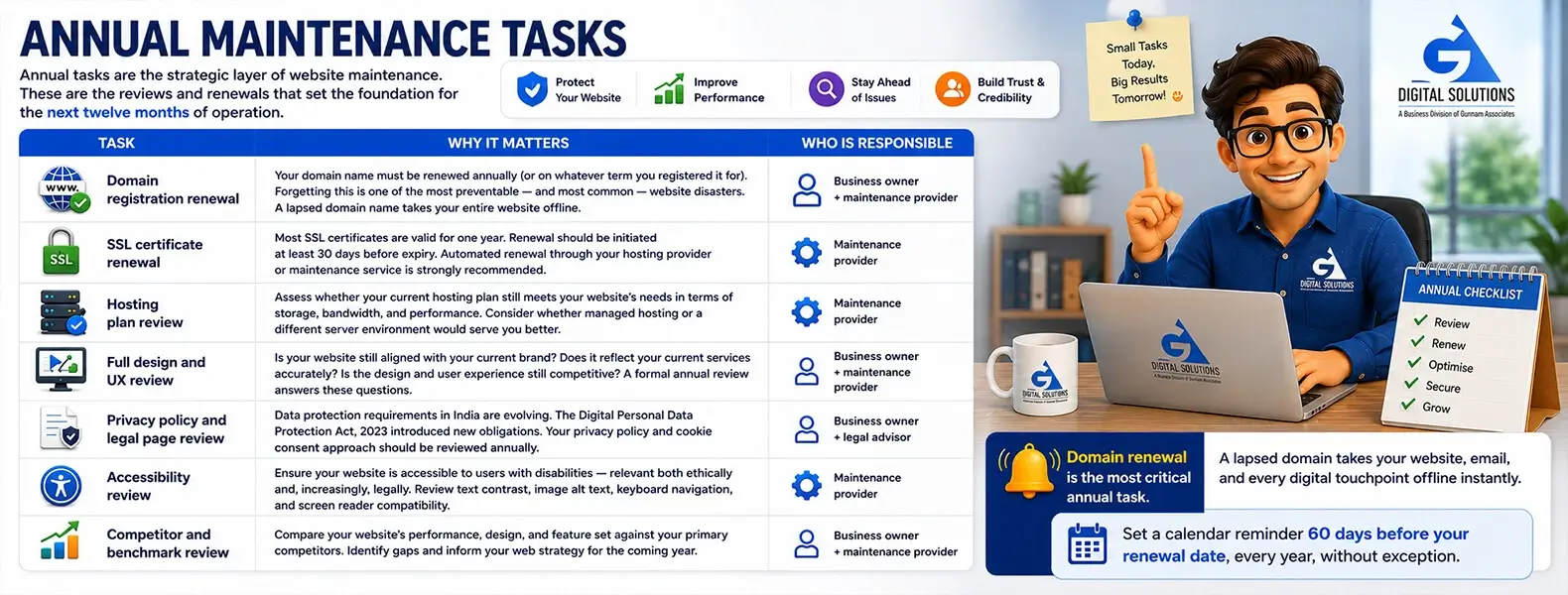
Annual tasks are the strategic layer of website maintenance. These are the reviews and renewals that set the foundation for the next twelve months of operation.
| Task | Why It Matters | Who Is Responsible |
|---|---|---|
| Domain registration renewal | Your domain name must be renewed annually (or on whatever term you registered it for). Forgetting this is one of the most preventable — and most common — website disasters. A lapsed domain name takes your entire website offline. | Business owner + maintenance provider |
| SSL certificate renewal | Most SSL certificates are valid for one year. Renewal should be initiated at least 30 days before expiry. Automated renewal through your hosting provider or maintenance service is strongly recommended. | Maintenance provider |
| Hosting plan review | Assess whether your current hosting plan still meets your website's needs in terms of storage, bandwidth, and performance. Consider whether managed hosting or a different server environment would serve you better. | Maintenance provider |
| Full design and UX review | Is your website still aligned with your current brand? Does it reflect your current services accurately? Is the design and user experience still competitive? A formal annual review answers these questions. | Business owner + maintenance provider |
| Privacy policy and legal page review | Data protection requirements in India are evolving. The Digital Personal Data Protection Act, 2023 introduced new obligations. Your privacy policy and cookie consent approach should be reviewed annually. | Business owner + legal advisor |
| Accessibility review | Ensure your website is accessible to users with disabilities — relevant both ethically and, increasingly, legally. Review text contrast, image alt text, keyboard navigation, and screen reader compatibility. | Maintenance provider |
| Competitor and benchmark review | Compare your website's performance, design, and feature set against your primary competitors. Identify gaps and inform your web strategy for the coming year. | Business owner + maintenance provider |
Domain renewal is the most critical annual task. A lapsed domain takes your website, email, and every digital touchpoint offline instantly. Set a calendar reminder 60 days before your renewal date, every year, without exception.
Maintenance Frequency by Website Type
Not all websites need the same level of maintenance. Here is a quick-reference summary of recommended frequency by site type.
| Website Type | Daily | Weekly | Monthly | Quarterly | Annually |
|---|---|---|---|---|---|
| E-Commerce Store | Required | Required | Required | Required | Required |
| Booking / Clinic Site | Required | Required | Required | Required | Required |
| Lead Generation Site | Required | Recommended | Required | Required | Required |
| Brochure / Info Site | Recommended | Recommended | Required | Required | Required |
| Blog / Content Site | Recommended | Recommended | Required | Required | Required |
| Portfolio Site | Recommended | Optional | Required | Recommended | Required |
“Required” = should not be skipped without accepting meaningful risk. “Recommended” = strongly advisable for most businesses. “Optional” = beneficial but can be skipped if resources are constrained.
Signs Your Website Is Already Behind on Maintenance
If you are reading this and realising that some — or all — of the above has not been happening, here are the most reliable warning signs that your website needs immediate attention.
- ✗ You cannot confirm when your last backup was taken or where it is stored
- ✗ Your plugins or WordPress version have not been updated in over 60 days
- ✗ You have not tested your contact form in the last month
- ✗ You do not know when your SSL certificate expires
- ✗ You have not reviewed your website's Google Analytics in the last 90 days
- ✗ Your website takes more than 3 seconds to load on a mobile phone
- ✗ You have no idea whether your website has been scanned for malware recently
- ✗ Your website still contains outdated information — old phone numbers, a former team member, expired offers
If three or more of the above apply to your website right now, a professional maintenance review is overdue. The longer it is left, the more risk accumulates.
Managing This Schedule: DIY vs. Professional
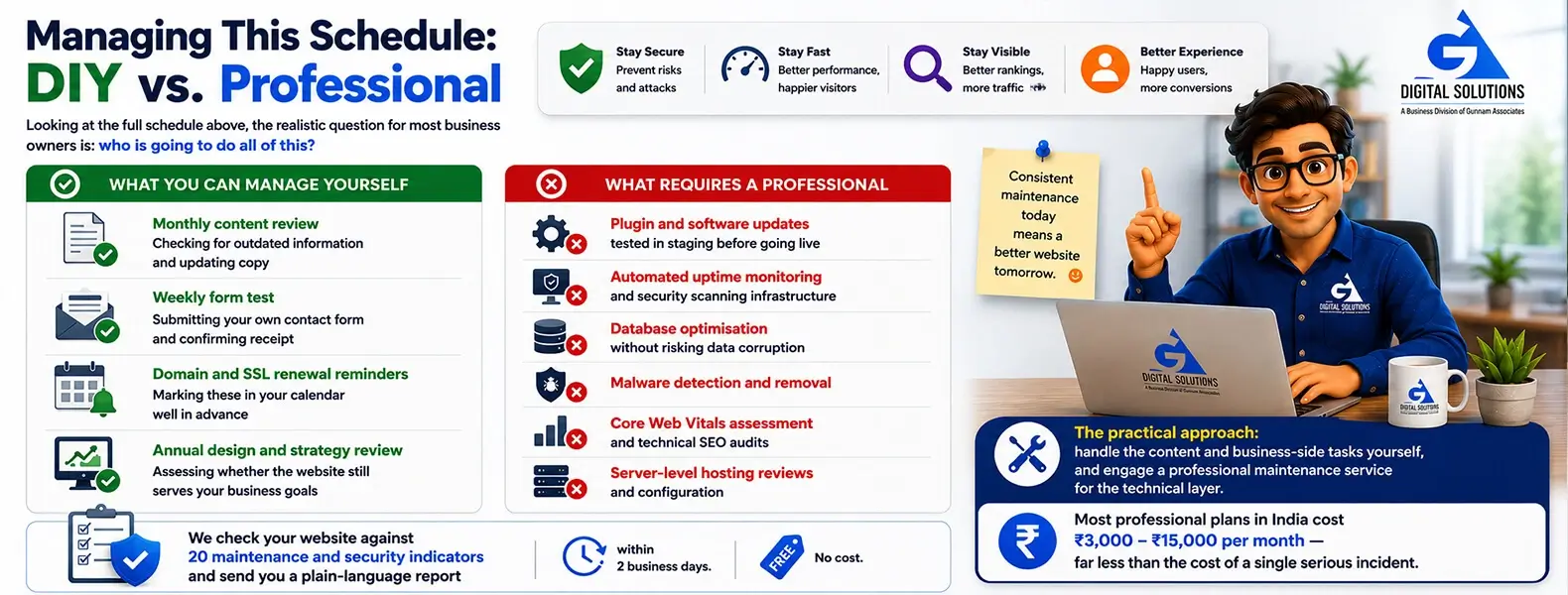
Looking at the full schedule above, the realistic question for most business owners is: who is going to do all of this?
What You Can Manage Yourself
- ✔ Monthly content review — checking for outdated information and updating copy
- ✔ Weekly form test — submitting your own contact form and confirming receipt
- ✔ Domain and SSL renewal reminders — marking these in your calendar well in advance
- ✔ Annual design and strategy review — assessing whether the website still serves your business goals
What Requires a Professional
- ✗ Plugin and software updates tested in staging before going live
- ✗ Automated uptime monitoring and security scanning infrastructure
- ✗ Database optimisation without risking data corruption
- ✗ Malware detection and removal
- ✗ Core Web Vitals assessment and technical SEO audits
- ✗ Server-level hosting reviews and configuration
The practical approach: handle the content and business-side tasks yourself, and engage a professional maintenance service for the technical layer. Most professional plans in India cost ₹3,000 – ₹15,000 per month — far less than the cost of a single serious incident.
→ Not Sure Where Your Website Stands? Get a Free 20-Point Health Audit
We check your website against 20 maintenance and security indicators and send you a plain-language report within 2 business days. No cost. No obligation.
Frequently Asked Questions
For any website that plays a role in your business — generating leads, building credibility, handling bookings, or selling products — yes. Monthly maintenance is the minimum standard for protecting your investment. The consequence of skipping months is not always immediate, but the accumulated risk is real: outdated software, degraded performance, and an increasing probability of a serious incident.
Partly. Website builders like Wix and Squarespace handle core platform updates and server security automatically. This reduces the technical maintenance burden significantly. However, you still need to review your content regularly, test your forms, monitor your analytics, renew your domain, and periodically assess your website's design and performance. The schedule is lighter, but not absent.
If your website is on WordPress, log in to your WordPress dashboard and navigate to Dashboard > Updates. This page shows you all available updates for your core installation, plugins, and themes. If you see a significant number of pending updates — especially if any are marked as security updates — they should be applied as soon as possible, ideally after backing up your site and testing in a staging environment first.
Some updates — such as minor WordPress core updates — can be set to apply automatically. However, major plugin and theme updates carry compatibility risks and should not be applied automatically to a live site without testing. The right approach is automated backups and security monitoring combined with human-reviewed, staged updates for everything else.
Log in to the account where you registered your domain name — typically your domain registrar (GoDaddy, Namecheap, BigRock, etc.) — and check the expiry date listed for your domain. For SSL, log in to your hosting panel (cPanel, Plesk, etc.) and look for your SSL/TLS settings. Your maintenance provider should be tracking both of these on your behalf and alerting you well in advance of expiry.
Summary: Your Website Maintenance Frequency at a Glance
Here is the complete framework in one place.
| Frequency | Key Tasks |
|---|---|
| Daily | Uptime monitoring · Security scanning · Backups (e-commerce / high-traffic) |
| Weekly | Plugin update review · Performance spot-check · Form test · Spam cleanup · Backups (standard sites) |
| Monthly | Software updates (staged) · Database optimisation · Broken link check · SSL status · Security review · Content review · Analytics report · Conversion audit |
| Quarterly | Full security audit · Core Web Vitals · SEO technical health · Content audit · Hosting review · Third-party integrations |
| Annually | Domain renewal · SSL renewal · Hosting plan review · Full design and UX review · Privacy policy update · Accessibility review · Competitor benchmark |
If you are not currently covering all of these frequencies, start with the most urgent: confirm your backups are running, apply any overdue security updates, and test your contact forms. Then work outward from there.
And if you would like a professional team to handle all of it — so none of this falls through the cracks — GA Digital Solutions' website maintenance plans are designed to do exactly that.
→ Get My Free Website Health Audit — See Exactly Where Your Site Stands in 2026
Continue Reading
Explore the full GA Digital Solutions website maintenance guide series.
Core Guides
- Website Maintenance Services: The Complete Guide for Indian Businesses (2026)
- What Is Website Maintenance? Everything Business Owners Need to Know
- Why Website Maintenance Is Important: 10 Risks of Neglecting Your Site
- The Complete Website Maintenance Checklist
- What Happens If You Don't Maintain Your Website?
GA Digital Solutions is a full-service digital agency based in Hyderabad, India. We provide website maintenance, design and development, SEO, performance marketing, and lead management services to businesses across India.
