








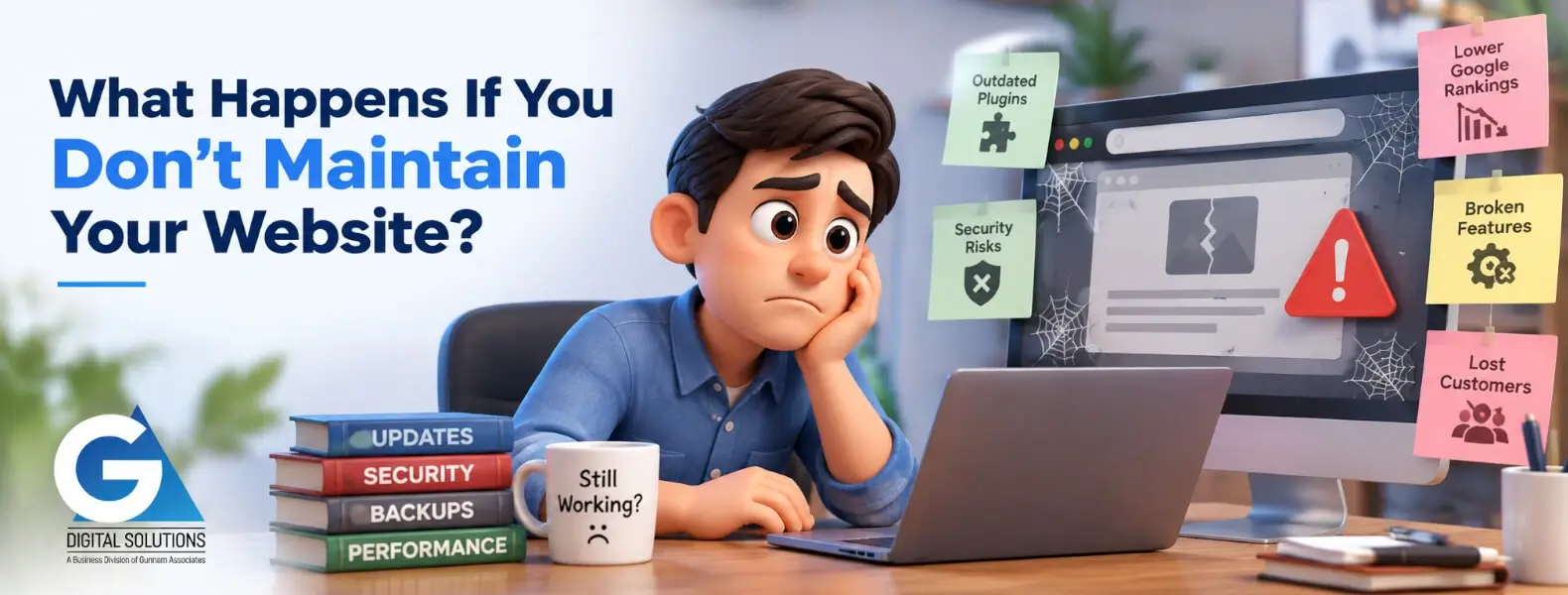
What Happens If You Don’t Maintain Your Website? Real Consequences + How to Fix Them (2026)
Last updated: April 2026 · 12-minute read · By GA Digital Solutions, Hyderabad
The answer to the question in this article's title is not dramatic. It is not a single catastrophic event. It is something quieter and, in many ways, harder to deal with: a slow, compounding deterioration that becomes harder and more expensive to reverse the longer it continues.
This article does not deal in hypotheticals. It documents what actually happens — in real scenarios experienced by real businesses — when a website is left without proper maintenance. For each scenario, it also explains exactly how proper maintenance prevents it and what to do if you are already facing it.
If you are reading this because something is already wrong with your website, skip directly to the relevant scenario section. If you are reading it to understand the risks before they become your reality, read it in order.
The Slow Burn: How Website Neglect Actually Works
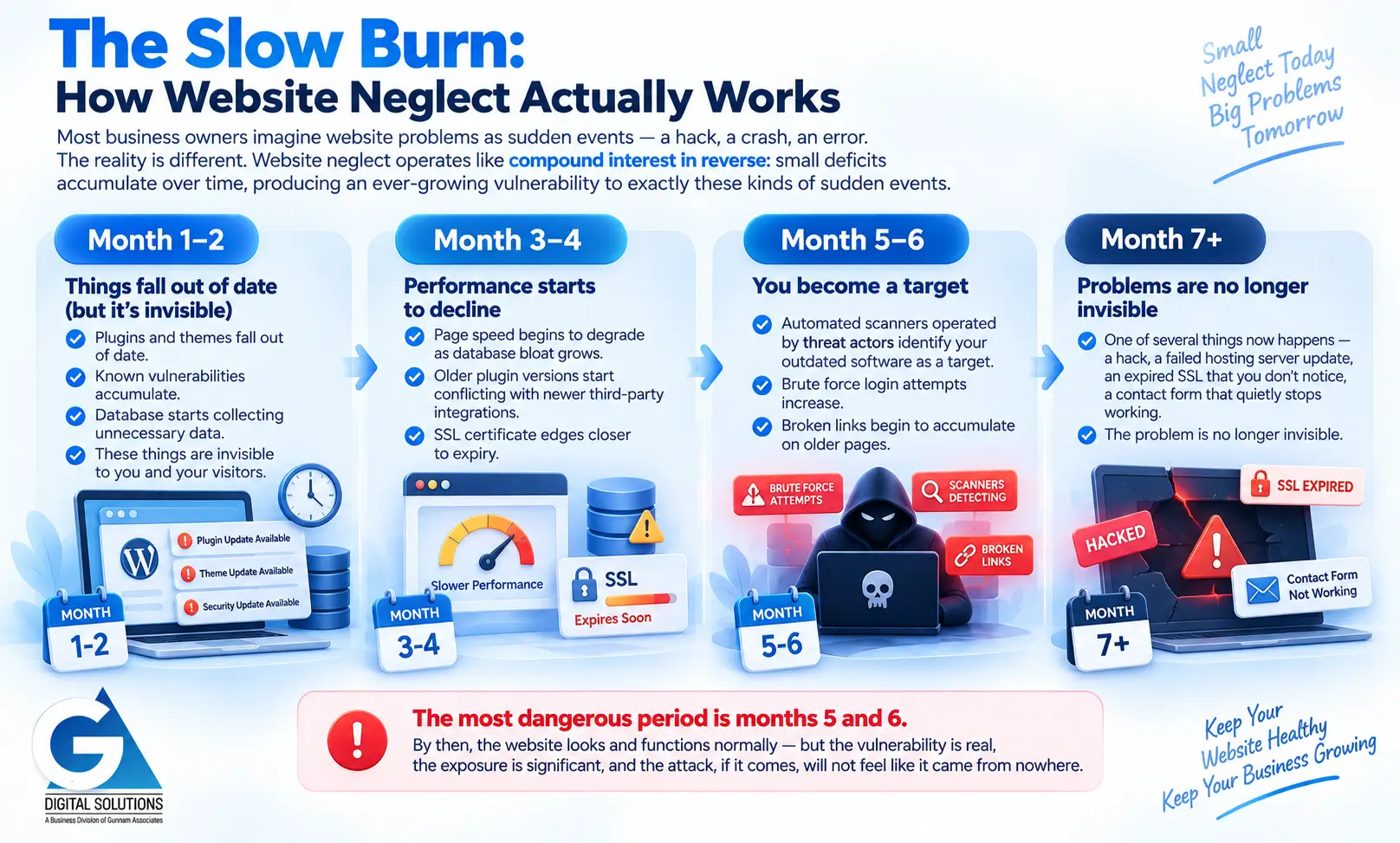
Most business owners imagine website problems as sudden events — a hack, a crash, an error. The reality is different. Website neglect operates like compound interest in reverse: small deficits accumulate over time, producing an ever-growing vulnerability to exactly these kinds of sudden events.
Here is the typical timeline of a neglected website.
| Timeframe | What Is Happening (Even If Nothing Looks Wrong Yet) |
|---|---|
| Month 1–2 | Plugins and themes fall out of date. Known vulnerabilities accumulate. Database starts collecting unnecessary data. These things are invisible to you and your visitors. |
| Month 3–4 | Page speed begins to degrade as database bloat grows. Older plugin versions start conflicting with newer third-party integrations. SSL certificate edges closer to expiry. |
| Month 5–6 | Automated scanners operated by threat actors identify your outdated software as a target. Brute force login attempts increase. Broken links begin to accumulate on older pages. |
| Month 7+ | One of several things now happens — a hack, a failed hosting server update, an expired SSL that you don't notice, a contact form that quietly stops working. The problem is no longer invisible. |
The most dangerous period is months 5 and 6. By then, the website looks and functions normally — but the vulnerability is real, the exposure is significant, and the attack, if it comes, will not feel like it came from nowhere.
Scenario 1: Your Website Is Hacked
This is the most common consequence of website neglect in India. It is also one of the most costly and disruptive.
Scenario: Hack via Outdated Plugin
A Hyderabad-based clinic had not updated its WordPress plugins in eight months. A vulnerability in one of its contact form plugins — publicly disclosed and patched by the developer — was exploited by an automated scanning tool. Malicious code was injected into the website's theme files, redirecting mobile visitors to a fraudulent pharmaceutical website. The clinic had no idea for three weeks. Discovery came when a patient mentioned that the website "behaved strangely" on their phone.
Timeline to impact: Three weeks from injection to discovery. Immediate impact on mobile visitors, who make up over 65% of clinic website traffic.
How maintenance prevents this: Monthly plugin updates (tested in staging) and weekly security scanning would have prevented this entirely. The vulnerability was patched 11 days before the attack. The update simply was not applied.
What Happens After a Hack
- The website may continue to look normal — while actively harming visitors or distributing malware
- Google detects the malicious content and removes the website from search results (blacklisting)
- Visitors see a browser security warning instead of your website
- Recovery requires professional malware removal, security hardening, and Google deblacklisting — a process that typically takes 1–3 weeks
- Rankings lost during the blacklist period rarely recover fully or quickly
The Fix: If Your Website Has Been Hacked
✅ Contact your maintenance provider or a security specialist immediately. Do not attempt to remove malware manually without expertise.
✅ Take the website offline temporarily if the infection is actively distributing malware to visitors.
✅ Restore from the most recent clean backup. If no backup exists, the recovery will be significantly more complex and expensive.
✅ After malware removal, patch all vulnerabilities that enabled the attack before going back online.
✅ Submit a deblacklisting request to Google via Search Console after the site is confirmed clean.
Scenario 2: Your Rankings Drop and Stay Down
Search engine ranking loss is the most common consequence of neglect that businesses notice — but typically only after it has already done significant damage.
Scenario: Gradual Performance Decline Causes Ranking Loss
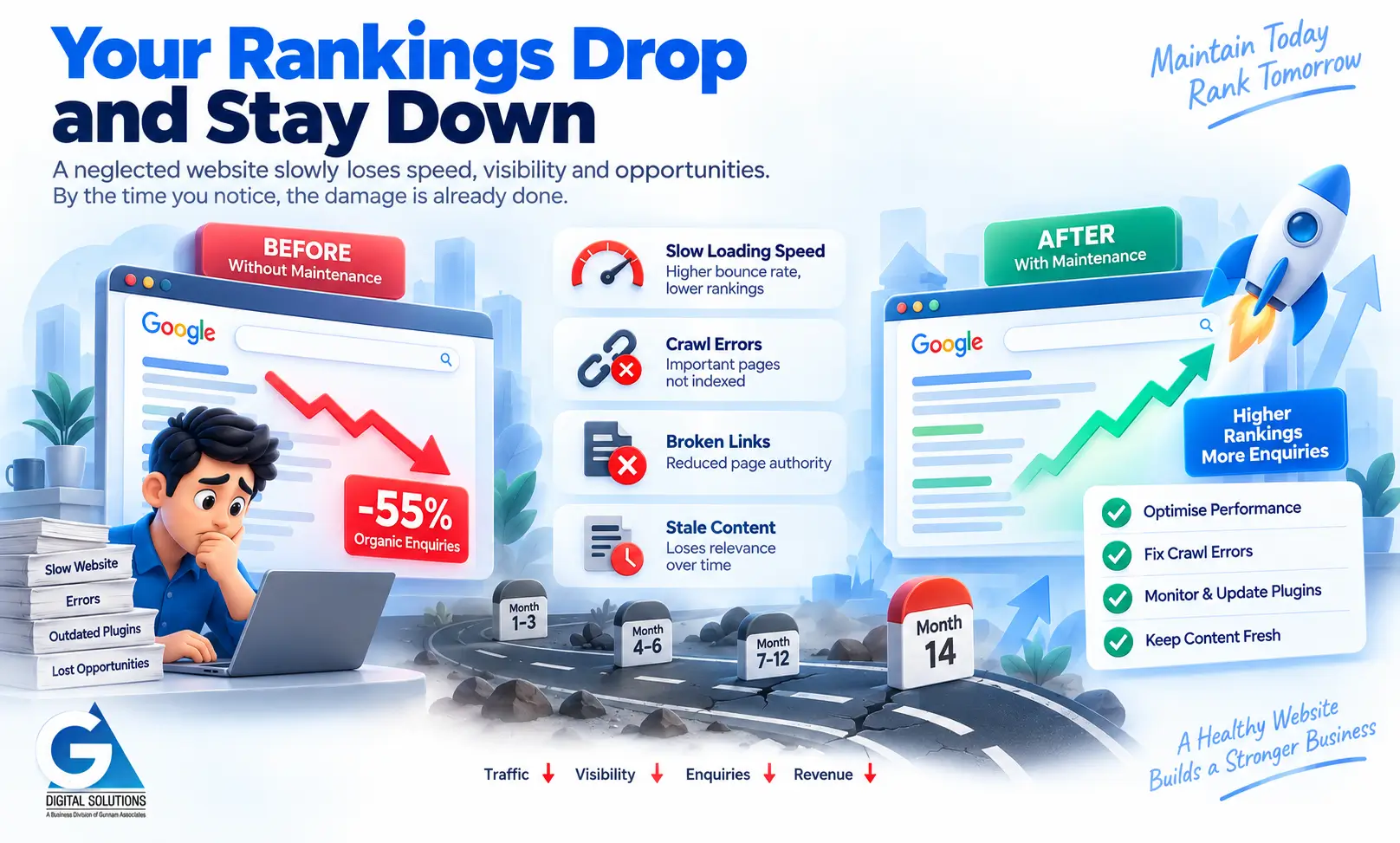
A real estate developer in Hyderabad launched a strong website in early 2024. By late 2025, enquiries from organic search had fallen by 55%. No algorithm penalty. No manual action from Google. The cause was simpler: the website had not been maintained. Database bloat had increased page load time from 1.8 seconds to 5.4 seconds. Several plugins conflicted with each other, producing JavaScript errors that prevented Google from fully indexing key project pages. The site was technically live and functional — but performing far below its potential.
Timeline to impact: 14 months from launch to a 55% decline in organic enquiries. No single dramatic event — a continuous slow deterioration.
How maintenance prevents this: Monthly database optimisation, plugin compatibility checks, and quarterly Core Web Vitals reviews would have identified each of these issues individually, well before they compounded into a 55% traffic loss.
What Causes Ranking Drops in Neglected Websites
- Page speed degradation — Google penalises slow-loading pages in mobile search rankings
- Core Web Vitals failures — poor LCP, INP, or CLS scores directly affect search positioning
- Crawl errors — JavaScript conflicts or broken pages prevent Google from indexing content correctly
- Broken internal links — disrupt Google's understanding of site structure and reduce page authority
- Thin or stale content — pages that have not been updated in years lose relevance signals over time
The Fix: If Your Rankings Have Dropped
✅ Run a Google Search Console crawl report to identify any indexing errors, coverage issues, or pages removed from the index.
✅ Test your Core Web Vitals scores and identify specific failing metrics. Address the highest-impact issues first.
✅ Run a full broken link audit and fix all internal 404 errors.
✅ Optimise your database and run a page speed test. Identify and address the largest contributors to load time.
✅ Publish or update at least one significant piece of content per month to maintain freshness signals.
Scenario 3: Your Contact Forms Stop Working
Broken contact forms are among the most financially costly — and most preventable — consequences of website neglect. They are also uniquely insidious because they fail silently.
Scenario: A WordPress Update Breaks the Enquiry Form
An education institute in Hyderabad updated its WordPress installation manually — directly on the live site, without testing. The update introduced a conflict with its contact form plugin. The form continued to display correctly on the website. Visitors filled it in and submitted it. The thank-you message appeared. But the enquiry was never delivered. The institute discovered the problem six weeks later, during a routine check, when they realised they had received no website enquiries for almost two months — during peak admissions season.
Timeline to impact: Six weeks. Peak admissions season. Estimated 200–300 missed enquiries based on typical traffic volumes.
How maintenance prevents this: Updates tested in a staging environment before going live. Weekly form functionality test. This specific scenario is caught and resolved in under 24 hours with either preventative measure in place.
Why Forms Break (And Why It Is Hard to Notice)
- Plugin updates introduce compatibility conflicts that break form processing without affecting the visible form
- Email deliverability settings change at the hosting level, causing form submissions to be sent to spam or discarded
- CAPTCHA or spam protection services expire or update their API requirements
- Third-party form services (Mailchimp, HubSpot, Zoho) update their integrations without warning
- Server configurations change during hosting platform updates
The Fix: If Your Forms Have Been Broken
✅ Test every form on your website right now. Submit a test enquiry and confirm receipt within 5 minutes.
✅ Check your email spam folder — form submissions may be arriving but being filtered.
✅ Review your form plugin for available updates and compatibility notes.
✅ Check your hosting email configuration. SMTP settings may need updating.
✅ If the issue cannot be quickly identified, consider temporarily adding a direct email address or WhatsApp contact to your website until the form is repaired.
Scenario 4: Visitors See a Security Warning
An SSL certificate expiry is one of the most preventable website emergencies — and one of the most damaging to visitor trust.
Scenario: SSL Expiry During a Campaign
A fashion e-commerce business in Hyderabad was running a paid Google Ads campaign driving significant traffic to its website. Midway through the campaign, its SSL certificate expired. Every visitor — including all those arriving from the paid campaign — was greeted by a full-screen browser warning: "Your connection is not private." Most immediately left. The business continued paying for the advertising traffic for approximately 36 hours before anyone noticed the issue.
Timeline to impact: 36 hours of paid traffic wasted. Estimated ₹18,000–₹24,000 in advertising spend directed at a broken landing experience.
How maintenance prevents this: Monthly SSL certificate status check with expiry date recorded. Automated renewal set up through hosting provider. Either measure prevents this entirely.
What Happens When SSL Expires
- Every major browser displays a full-screen red warning page before showing your website
- Visitors must actively click through a security warning to reach your site — most will not
- Google marks your site as insecure, which can affect rankings in addition to driving visitors away
- E-commerce sites with expired SSL cannot process payments securely — most payment gateways will also block transactions
- The damage to brand trust continues even after renewal, as visitors who saw the warning may not return
The Fix: If Your SSL Has Expired
✅ Contact your hosting provider immediately. SSL renewal is usually completed within a few hours.
✅ After renewal, confirm the padlock appears on all pages, including HTTPS redirects.
✅ Set up auto-renewal for all future SSL certificates to prevent recurrence.
✅ If you were running paid campaigns during the expiry, pause them until the certificate is restored and verified.
Scenario 5: You Lose Your Website Entirely
This is the scenario that becomes possible only when backups are absent or non-functional. It is the worst-case outcome of accumulated neglect — and it is entirely preventable.
Scenario: Server Failure With No Backup
A professional services firm in Hyderabad had used the same hosting provider for four years. The provider sent a renewal notice that went to the business owner's old email address. The hosting plan lapsed. The server was decommissioned. Five years of blog content, service pages, client testimonials, and SEO equity were gone. The hosting provider confirmed they did not retain data after account closure. The business had assumed backups were being taken automatically. They were not.
Timeline to impact: Immediate and permanent. Five years of content and domain authority, lost in a single event.
How maintenance prevents this: Automated off-site backups, verified monthly. Domain and hosting renewal tracked proactively, with 60-day advance reminders. Either measure prevents total loss.
The Fix: If Your Website Data Has Been Lost
✅ Check with your hosting provider immediately — some retain data for a short period after account closure or server failure.
✅ Check Google's cache and the Wayback Machine (web.archive.org) for archived versions of key pages. Some content can be recovered this way.
✅ Contact your web developer — they may have a local copy of your website files from the original build.
✅ If recovery is partial or complete, establish automated backups before relaunching. Do not rebuild without them in place.
✅ For complete rebuilds, prioritise the highest-traffic pages first, informed by Google Analytics historical data if available.
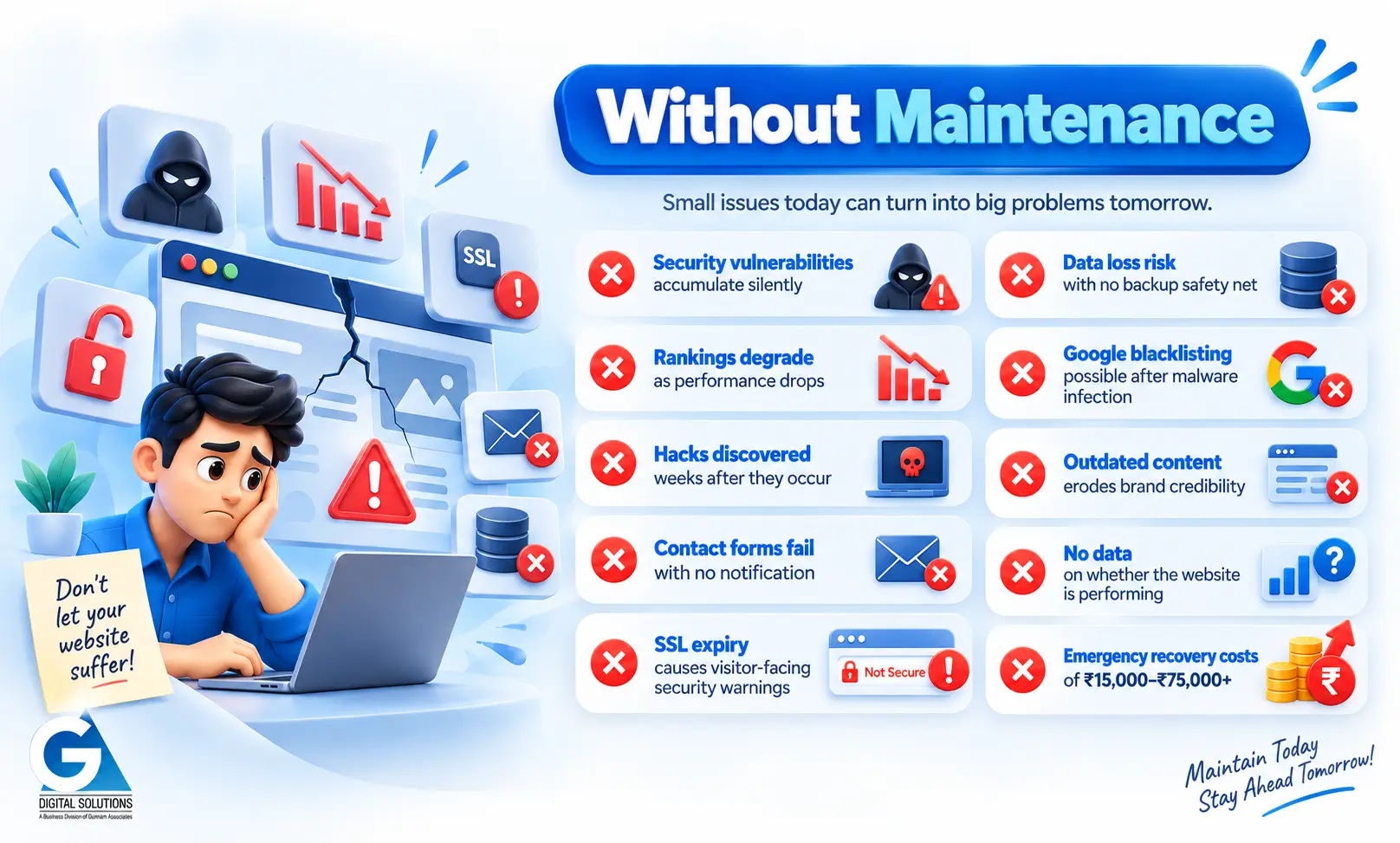
Maintained vs. Neglected: A Direct Comparison
Here is the clearest possible summary of the difference between a properly maintained website and a neglected one — across the dimensions that matter most for an Indian business.
| Without Maintenance | With Regular Maintenance |
|---|---|
| ✘ Security vulnerabilities accumulate silently | ✔ Updates applied monthly, vulnerabilities closed proactively |
| ✘ Rankings degrade as performance drops | ✔ Performance monitored and maintained, rankings protected |
| ✘ Hacks discovered weeks after they occur | ✔ Security scanning flags threats within hours |
| ✘ Contact forms fail with no notification | ✔ Forms tested weekly, failures caught and fixed immediately |
| ✘ SSL expiry causes visitor-facing security warnings | ✔ SSL monitored monthly, auto-renewed before expiry |
| ✘ Data loss risk with no backup safety net | ✔ Daily / weekly automated backups, verified and stored off-site |
| ✘ Google blacklisting possible after malware infection | ✔ Malware prevention; recovery plan in place if needed |
| ✘ Outdated content erodes brand credibility | ✔ Monthly content review keeps information current |
| ✘ No data on whether the website is performing | ✔ Monthly analytics report with plain-language insights |
| ✘ Emergency recovery costs of ₹15,000–₹75,000+ | ✔ Predictable monthly fee of ₹3,000–₹15,000 |
If Your Website Is Already Showing Signs of Neglect
You do not need to have experienced a serious incident to benefit from addressing website neglect. If your website has been running without regular maintenance, the most useful first step is to understand where things currently stand.
Here is a practical sequence for getting things back on track.
| Step | Action |
|---|---|
| 1 | Get a professional audit. Before doing anything else, understand the full picture. A website health audit identifies every current risk — security, performance, backups, content, technical SEO — so you can prioritise correctly. |
| 2 | Confirm your backups. Before making any changes to your website, verify that a current, working backup exists. If it does not, take one now. This is your safety net for everything that follows. |
| 3 | Apply security updates first. Patch all outdated plugins, themes, and your CMS platform. Test in staging if possible. This closes the most urgent vulnerability immediately. |
| 4 | Test all conversion points. Submit your contact forms, click your WhatsApp links, test your booking flow. Fix anything that is not working before doing anything else. |
| 5 | Address performance issues. Run a speed test and Core Web Vitals assessment. Identify and fix the most impactful issues: database bloat, unoptimised images, slow plugins. |
| 6 | Fix broken links and errors. Run a link scan, resolve all 404 errors, and check Google Search Console for crawl issues. |
| 7 | Establish an ongoing maintenance routine. Once immediate issues are resolved, put a proper schedule in place — either through a professional provider or a documented self-managed process — so the same problems do not recur. |
→ Start at Step 1: Get Your Free 20-Point Website Health Audit from GA Digital Solutions
We identify every current risk on your website and walk you through the findings within 2 business days. No cost. No obligation. No jargon.
Frequently Asked Questions
It is rarely too late, but the longer maintenance has been neglected, the more work is required to return the website to a healthy state. A professional audit will tell you exactly what needs to be done and in what order. In most cases, a neglected website can be stabilised and properly maintained going forward — the key is not to wait longer.
A professional website health audit is the most useful step. It will identify any gaps in your current maintenance process — tasks that have been missed, settings that are misconfigured, or areas where the work done has not been sufficient. Many business owners who manage their own websites discover that backups are not functioning as expected, or that security scanning has not been properly configured.
Recovery costs vary significantly depending on the state of the website and what has gone wrong. Emergency malware removal typically costs ₹15,000–₹50,000. A full rebuild after data loss can cost ₹50,000 or more. Ranking recovery is measured in months of lost revenue rather than a single cost. Bringing a neglected website back to a healthy state before a serious incident occurs is always considerably cheaper than recovering after one.
Yes. We regularly onboard websites that have been neglected or poorly maintained. Our process begins with a full audit to document the current state, followed by a prioritised recovery plan. Once the website is stable, we move it onto a standard maintenance schedule. The transition is managed carefully to avoid causing any additional disruption to your live website.
This depends on the severity of the neglect and the age of the website. If the website is structurally sound and the core content is valuable, restoration and ongoing maintenance is usually the right approach. If the website is several years old, running on an outdated framework, and has significant technical debt, a controlled rebuild on a modern platform may be the better long-term investment. A professional assessment will help you make the right call for your specific situation.
Summary
What happens if you do not maintain your website? In the short term: slow, invisible deterioration. In the medium term: degraded performance, broken functionality, and growing vulnerability. In the longer term: one or more of the five scenarios above — a hack, a ranking collapse, broken contact forms, an SSL failure, or total data loss.
None of these outcomes are inevitable. Every one of them is preventable through consistent, professional website maintenance. The cost of prevention is a fraction of the cost of recovery — in money, in time, and in the business that is lost while your website is not working the way it should.
If your website has been neglected, the best time to act was several months ago. The second-best time is now.
→ Get My Free Website Health Audit — Understand Where Your Site Stands Right Now
Continue Reading
Explore the full GA Digital Solutions website maintenance guide series.
Core Guides
- Website Maintenance Services: The Complete Guide for Indian Businesses (2026)
- What Is Website Maintenance? Everything Business Owners Need to Know
- Why Website Maintenance Is Important: 10 Risks of Neglecting Your Site
- How Often Should You Update Your Website?
- The Complete Website Maintenance Checklist
Evaluate Your Options
GA Digital Solutions is a full-service digital agency based in Hyderabad, India. We provide website maintenance, design and development, SEO, performance marketing, and lead management services to businesses across India.
Page last reviewed: April 2026
